
Price It, Program It, Run It, Get Paid
Price the estimate from your own Price Book. Get the quote e-signed the night you send it. Drag the programme around a rain day, and let the client watch it all from their own portal instead of your phone. One Hub runs the whole job. If you're on HubSpot, Buildxact or Xero, they stay in step underneath.
Pipeline, estimating, quote PDFs, scheduling, To-Dos and the client portal are native, on every plan.
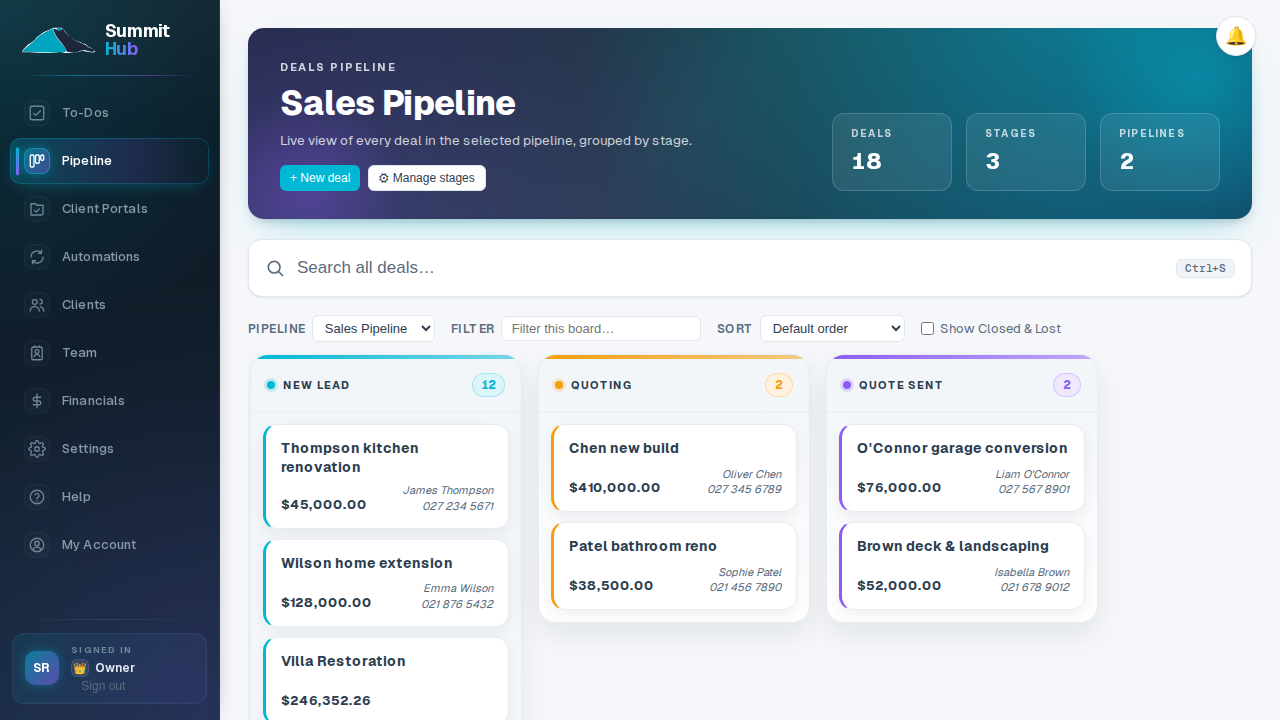
One job, followed through
Six moments every job hits, and what the Hub does at each of them now.
- 01The enquiry
It lands on the board, not in an inbox
A website enquiry becomes a deal in the right pipeline stage, contact attached, before anyone's back at the office. An automation can send the acknowledgement while you're still on the tools.
- 02The measure-up
Site notes stay on the deal
Sketch the wall run on the freehand notepad, draw the bathroom to scale in the 2D room planner (with a stylus, on site) and it's filed on the deal, not on a scrap of GIB.
- 03The price
The estimate comes from your own codes
Build it line by line from your Price Book (your materials and labour at what you pay today) or start from a saved estimate template. On Buildxact? It syncs in instead. Need a subbie's price? Send an RFQ and pull their number straight into the line.
- 04The quote
Signed the night you send it
Pick a quote template, download the branded PDF, or email it with a signing link. The client signs on their phone; the quote flips to Accepted, the signed copy is filed, and the Xero draft invoice raises itself.
- 05The site
The crew reads the programme, not your texts
Seed the Gantt from the estimate's categories, drag tasks around a rain day and the downstream work shifts itself. Field accounts read the scope and specs for their assigned jobs with no money showing; the To-Do board carries the rest.
- 06The money & the client
Both watched, neither chased
Xero invoices land against the estimate category by category, so margin drift shows while the job's still running. The client watches the same story on their branded portal (photos, decisions, the cost chart) instead of ringing you.
Quote from what you pay today, not what you paid last winter
Keep your own codes for materials and labour with the price you actually pay, and build estimates from them. When the merchant reprices, load the new list: quotes you've already sent stay put, and everything you price next uses the new numbers.
- Your codes, your rates. TIMBER-4X2 means the same thing on every estimate, priced once.
- Supplier lists in one import. Paste or upload the price list; the book updates without touching sent quotes.
- Templates on top. Save your standard new-build or reno line-ups and import them into any estimate.
Price Book and native estimating are on every plan.
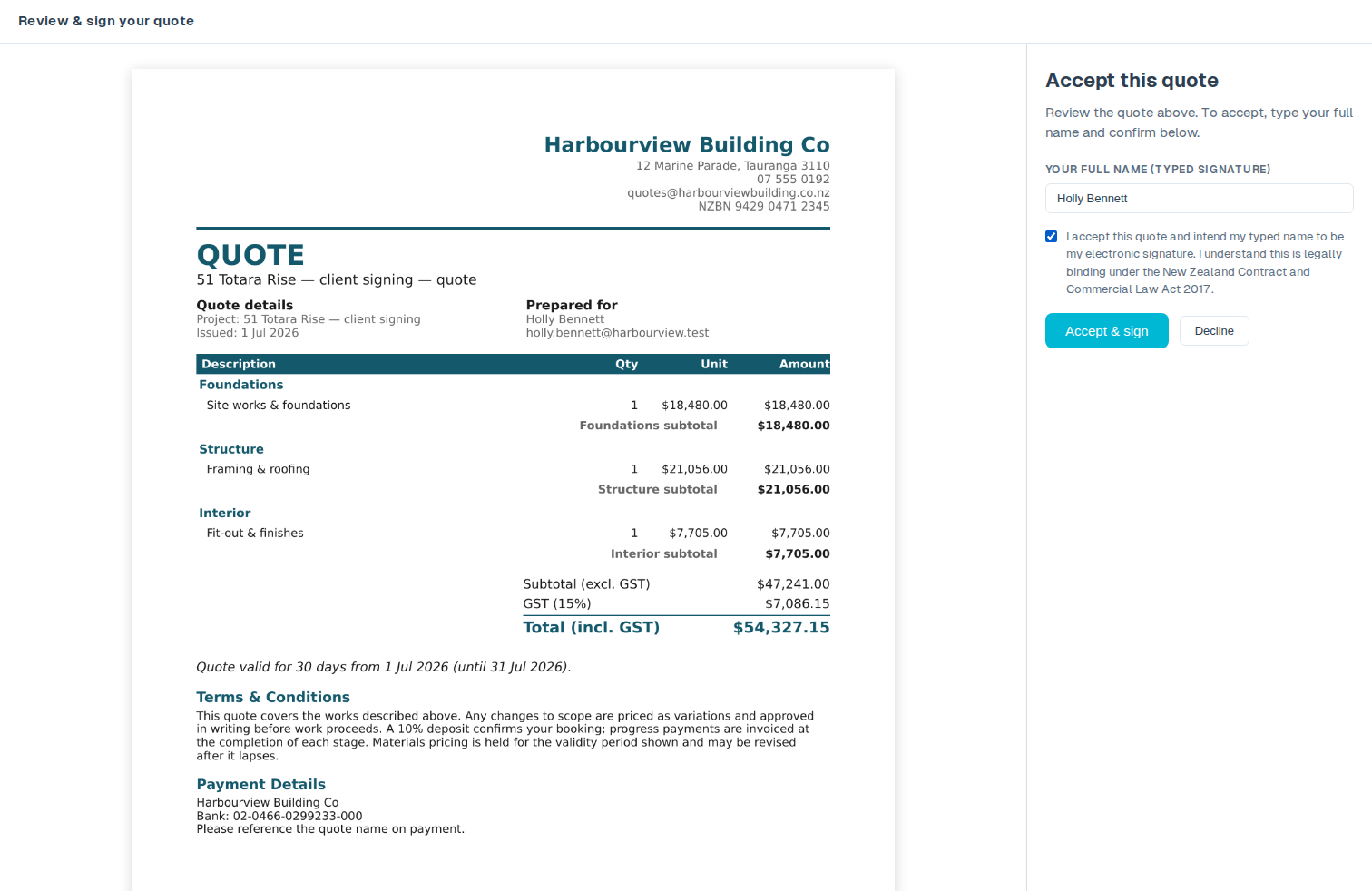
Clients e-sign your quote, and it accepts itself
Send the client a secure link to sign your quote online. The moment they sign, the quote flips to Accepted, a signed PDF is filed against the job, and the signing is recorded, with no printing, scanning or chasing a reply.
- Sign from any device. The client opens one clean page, signs, and they're done: no account, nothing to install.
- Accepts on its own. A signed quote moves straight to Accepted on your board, with the signed PDF filed against the job. You don't lift a finger.
- On file and on the record. Electronic signatures are recognised under Part 4 of NZ's Contract and Commercial Law Act 2017. Summit Hub records the signer, the timestamp, their IP address and the exact document hash, kept with the signed PDF.
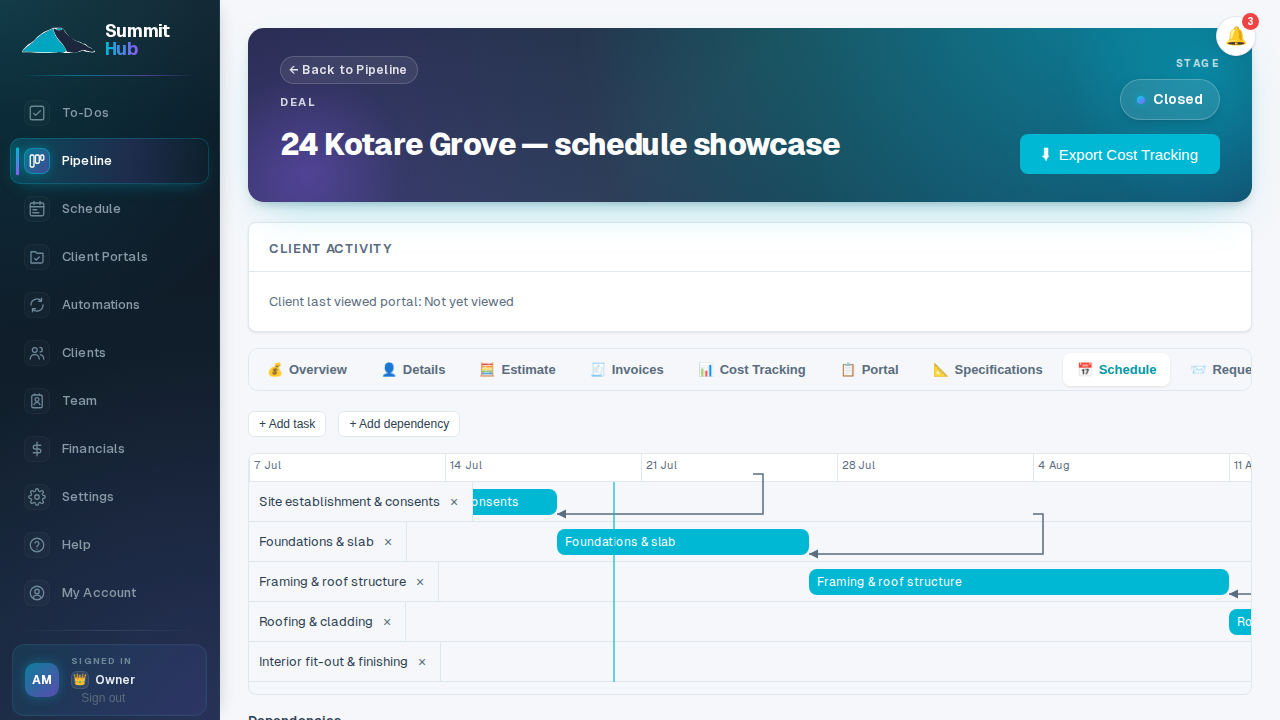
A rain day moves one task, the rest move themselves
Lay the job out as draggable tasks, seeded from the estimate's categories. Wire up the dependencies once, and pushing the frame stage out two days shifts everything downstream. The crew subscribes from Google, Outlook or Apple Calendar, so their phones already know.
- Seeded from the estimate. Start from your categories, not a blank timeline.
- Dependencies do the shuffling. Finish-to-start links move downstream tasks when you move one.
- Weekends and stat days skipped. Plan onto working days, including NZ public holidays and your region's anniversary.
Job scheduling is on every plan.
The supplier quote types itself into the estimate
Attach the PDF, tick the lines you want, press Add. The assistant reads your live deals, estimates and schedule through the permissions your account already has. Anything hard to undo stops on an Approve/Decline card first.
- It does the typing. Add the line item, create the task, import the template: you watch it land.
- Nothing destructive slips through. Deleting a line or marking a quote sent waits for your approval, naming the exact record.
The AI assistant comes with the Company plan, for your staff only.
Plugs into the tools you already run
No rip-and-replace. Summit Hub mirrors HubSpot, Buildxact and Xero and keeps them in step, but the pipeline, estimating, programme and financials live natively in the app.
- CRM
 HubSpotDeals and contacts flow in from your CRM. Lead statuses update automatically as projects progress.
 - EST
 BuildxactEstimates and job data stay in sync. Variations and cost breakdowns appear alongside your pipeline.
 - FIN
 XeroDraft invoices and contacts are created automatically. Payment statuses sync back to your deal view.
Every plan runs the whole job
The rest of the set
The same job, drawn for the other people holding it.
Run the whole job from one Hub.
Sign up and your pipeline, estimating, programme and portal are running the same day. Anything you already run in HubSpot, Buildxact or Xero keeps working underneath.
Get Started